
In Sitecore XM Cloud, there are not many examples of queries utilizing the Component GraphQL Query field in the GraphQL section of the Json Rendering for React components. Here is an example that does not flatten the tree, but delivers a nested JSON object to React.
Creating the Menu from a Data Source
The out of the box Sitecore example builds the site menu from pages within the site. This example builds the site menu from a data source added to a header menu rendering.
Data Templates
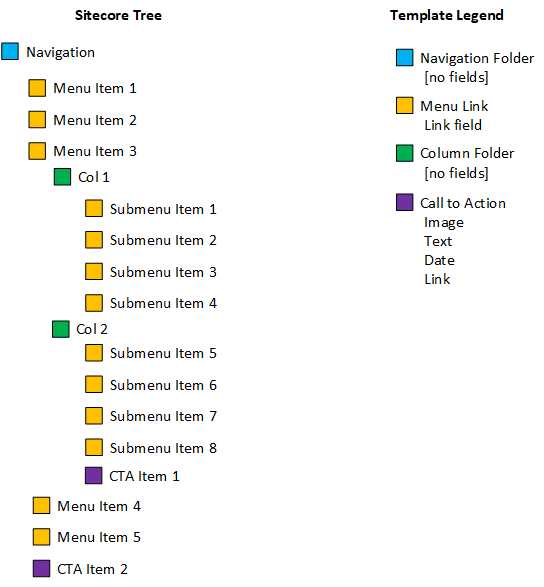
Create data templates for a folder structure in the tree containing Navigation, Navigation Links, Columns, Call to Actions, Images and any other data that may appear in the menu.
Build out the tree for the navigation under the Data folder for your XM Cloud site.
Json Rendering
Create a JSON Rendering under Layouts/Renderings for the new navigation component. Fill in the Component Name field with the React component name you will provide later. In the Component GraphQL Query, enter a query like this:
query MainNavigationLinkQuery($datasource: String!, $language: String!) {
 datasource: item(path: $datasource, language: $language) {
  children {
   results {
    link: field(name: "Link") { value: jsonValue }
    ctasTitle: field(name: "CTAs Title") { value: jsonValue }
    isAlignedRight: field(name: "Is Aligned Right") { value: value }
    children {
     results {
      image: field(name: "Image") { value: jsonValue }
      text: field(name: "Text") { value: jsonValue }
      date: field(name: "Date") { value: jsonValue }
      link: field(name: "Link") { value: jsonValue }
       children {
         results {
           link: field(name: "Link") { value: jsonValue }
                 }
                }
               }
             }
            }
           }
  }
}
My example has additional fields for CTA Title and a checkbox for “Is Aligned Right”. Where the out of the box example for Navigation is a flat list, this example adds three nested layers to the navigation: links, columns and sub-links (with call to actions at any level are at).
React
The JSON object passed to React looks like
export type ResultsFieldLink = {
  ctasTitle: { value: TextField; };
  link: { value: LinkField; };
  isAlignedRight: { value?: string; };
  children: Children;
};

export type Children = {
  results: Results[];
};

export type Results = {
  date: { value?: TextField; };
  image: { value?: ImageField; };
  text: { value: TextField; };
  link: { value: LinkField; };
  children: Children;
};

export type Cta = {
  date: { textField?: TextField; };
  image: { imageField?: ImageField; };
  link: { linkField: LinkField; };
  text: { textField: TextField; };
};
In React, I retrieve the datasource and split the data into right and left before building out my HTML, using two function (getColData, getCtaData) to get columns and CTA data:
.
.
.
const getColData = function getColData(results: Results[]): Column[] {
  const col: Column[] = [];
  results.forEach((element: Results) => {
    if (element.children.results.length > 0) {
      const row: LinkField[] = [];
      element.children.results.forEach((rslt: Results) => {
        row.push(rslt.link.value);
      });
      col.push({ link: row });
    }
  });
  return col;
};

const getCtaData = function getCtaData(results: Results[]): Cta[] {
  const cta: Cta[] = [];
  results.forEach((element: Results) => {
    if (element.children.results.length === 0) {
      const ctaNew: Cta = {
        date: { textField: element.date.value },
        image: { imageField: element.image.value },
        link: { linkField: element.link.value },
        text: { textField: element.text.value },
      };
      cta.push(ctaNew);
    }
  });
  return cta;
};

export const Default = (props: MainNavigationProps): JSX.Element => {
  const datasource = props.fields?.data?.datasource;
  const id = props.rendering.uid;
  const { sitecoreContext } = useSitecoreContext();

  if (datasource) {
    if (datasource.children.results.length > 0) {
      const navLink = datasource.children.results
        .filter((element: ResultsFieldLink) => !element.isAlignedRight.value)
        .map((element: ResultsFieldLink, key: number) => (
          <MainNavigationItem
            index={key}
            key={`${key}${element.link.value}`}
            totalLeftAligned={
              datasource.children.results.filter((res) => !res.isAlignedRight.value).length
            }
            link={element.link.value}
            ctasTitle={element.ctasTitle.value}
            isAlignedRight={element.isAlignedRight.value ? true : false}
            hasSubnav={element.children.results.length > 0 ? true : false}
            cols={element.children.results.length ? getColData(element.children.results) : null}
            ctas={element.children.results.length ? getCtaData(element.children.results) : null}
          />
        ));

      const rightLink = datasource.children.results
        .filter((element: ResultsFieldLink) => element.isAlignedRight.value)
        .map((element: ResultsFieldLink, key: number) => (
          <RightNavigationItem
            index={key}
            key={`${key}${element.link.value}`}
            totalLeftAligned={
              datasource.children.results.filter((res) => !res.isAlignedRight.value).length
            }
            link={element.link.value}
            ctasTitle={element.ctasTitle.value}
            isAlignedRight={element.isAlignedRight.value ? true : false}
            hasSubnav={element.children.results.length > 0 ? true : false}
            cols={element.children.results.length ? getColData(element.children.results) : null}
            ctas={element.children.results.length ? getCtaData(element.children.results) : null}
          />
        ));

      return (
        <>
          <nav className="main-nav">
            <div className="container">
              <div className="row">
                <div className="col-12">
                  <ul role="list">{navLink}</ul>
                  <div className="highlighted-link">{rightLink}</div>
                </div>
              </div>
            </div>
          </nav>
        </>
      );
    } else if (sitecoreContext?.pageEditing) {
      return <p>No links found</p>;
    }
  } else if (sitecoreContext?.pageEditing) {
    return <p>Choose a data source.</p>;
  }

  return (
    <div className={styles} id={id ? id : undefined}>
      <div className="component-content">
        <h3>Main Navigation</h3>
      </div>
    </div>
  );
};
 Sitecore XM Cloud