
I want to create a facet using Sitecore Search with blog tags and I want each blog post to have many tags and each tag to belong to many blog posts. I did this by creating an out-of-the-box facet in Sitecore Search Customer Engagement Console utilizing a string array and manipulating the array with custom code.
Tags Attribute and Meta Data
To start, I look at my Attributes in Sitecore Search Customer Engagement Console by going to the Administration tab and clicking on Domain Settings. In the Attributes card, I click on Tags and see that this Attribute is what I want because: it is an array of strings; it is returned in the API response; and it is used in the feature Facets (as shown on the Use For Features card).
I’ve been adding tags to my blogs in WordPress, so I look at the source of my blogs and see that the tags are wrapped in an anchor tag with the rel="tag" property:

My next step is to populates the Tag attribute with the Document Extractor using the information from the HTML source of my blogs.
Document Extractor
I access my Source for the blogs, and Edit the Document Extractors and edit my Tagger for content. For the document extractor I messed around a lot to try to populate an array of strings, that is why I created a constant in Cheerio for easy manipulation (of adding quotes or single quotes or whatever was needed until my extractor looked correct):
function extract(request, response) {
    $ = response.body;
    const preTags = $('a[rel="tag"]');
    let listTags = "";
      preTags.each(function (idx, el) {
        listTags += $(el).text() + ",";
      });
      listTags = listTags.slice(0, -1);
    return [{
        'description': $('meta[property="og:description"]').attr('content'),
        'name': $('meta[property="og:title"]').attr('content'),
        'type': $('meta[property="og:type"]').attr('content') || 'website_content',
        'url': $('meta[property="og:url"]').attr('content'),
        'date':  $('meta[property="article:published_time"]').attr('content'),
        'tags': listTags
    }];
}
The result, as seen in the Content Collection page, looks like this:
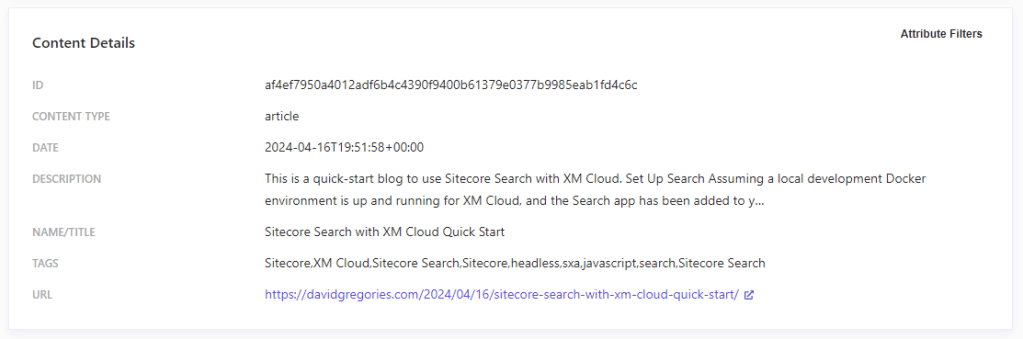
The RFK Details for Tags looks like:

I was expecting—and trying to populate it so—each string would have quotes around it. That is what is shown on the Working with Attributes page under the “Attribute data types and accepted formats” section of the Sitecore Search documentation (see References). No matter what I tried, I got quotes around the entire array of strings, thereby always making it an array of one string, containing many comma separated strings. I gave up trying to populate this correctly and decided to fix it in code with my own custom facet, still utilizing the Tags attribute.
Code
This section discusses the custom code and how it integrates with the out-of-the-box code to retrieve and manipulate facets. It uses the code in my other blog, Sitecore Search with XM Cloud Quick Start, as the starting point.
Comment OOTB Code and Get List of Tags
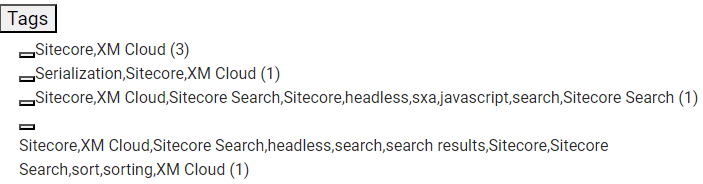
I look at the out-of-the-box facet for Tags and see that it is treating each unique entry as a complete string (see below). This is not what I want, and even if the code broke them out as separate strings, it probably would not treat them as a many to many relationship (which makes sense for me with few blogs and few tags, a larger site with many blogs may want each blog to be categorized to one tag.
I comment out the Facets in my code, but I leave the “Clear Filters” functionality because I want the user to be able to show all search results, even ones without a tag:
             <section>
              {selectedFacetsFromApi.length > 0 && (
                <button onClick={onClearFilters}>Clear Filters</button>
              )}
              {/*  <ul>
                {selectedFacetsFromApi.map((selectedFacet) => (
                  <li
                    key={`${selectedFacet.facetId}${selectedFacet.facetLabel}${selectedFacet.valueLabel}`}
                  >
                   .
                   .
                   .
                  </AccordionFacets.Facet>
                ))}
              </SearchResultsAccordionFacets> */}
            </section>
In the top level, in the body of the Search Results code, I add a new Type to store my terms and their associated Facet IDs and a new constant based on the new Type:
type TermFacet = {
  term: string;
  facetIds: string[];
};
const keyWords: TermFacet[] = [];
Then within the SearchComponent constant, under the selectedSortIndex constant, I added some code to get my facet values for Tags and split them up, using my TermFacet type and my keyWords constant:
  facets.forEach((facet) => {
    if (facet.name === 'tags') {
      facet.value.forEach((v) => {
        v.text.split(',').forEach((term: string) => {
          if (keyWords.some((k) => k.term === term && k.facetIds.indexOf(v.id) < 0)) {
            keyWords[keyWords.findIndex((k) => k.term === term)].facetIds.push(v.id);
          } else if (keyWords.findIndex((k) => k.term === term) < 0) {
            keyWords.push({ term, facetIds: [v.id] });
          }
        });
      });
    }
  });
I check my keyWords object in the console and make sure it looks good:
[
    {
        "id": "facetid_eyJ0eXBlIjoiZXEiLCJuYW1lIjoidGFncyIsInZhbHVlIjoiU2l0ZWNvcmUsWE0gQ2xvdWQifQ==",
        "text": "Sitecore,XM Cloud",
        "count": 3
    },
    {
        "id": "facetid_eyJ0eXBlIjoiZXEiLCJuYW1lIjoidGFncyIsInZhbHVlIjoiU2VyaWFsaXphdGlvbixTaXRlY29yZSxYTSBDbG91ZCJ9",
        "text": "Serialization,Sitecore,XM Cloud",
        "count": 1
    },
    {
        "id": "facetid_eyJ0eXBlIjoiZXEiLCJuYW1lIjoidGFncyIsInZhbHVlIjoiU2l0ZWNvcmUsWE0gQ2xvdWQsU2l0ZWNvcmUgU2VhcmNoLFNpdGVjb3JlLGhlYWRsZXNzLHN4YSxqYXZhc2NyaXB0LHNlYXJjaCxTaXRlY29yZSBTZWFyY2gifQ==",
        "text": "Sitecore,XM Cloud,Sitecore Search,Sitecore,headless,sxa,javascript,search,Sitecore Search",
        "count": 1
    },
    {
        "id": "facetid_eyJ0eXBlIjoiZXEiLCJuYW1lIjoidGFncyIsInZhbHVlIjoiU2l0ZWNvcmUsWE0gQ2xvdWQsU2l0ZWNvcmUgU2VhcmNoLGhlYWRsZXNzLHNlYXJjaCxzZWFyY2ggcmVzdWx0cyxTaXRlY29yZSxTaXRlY29yZSBTZWFyY2gsc29ydCxzb3J0aW5nLFhNIENsb3VkIn0=",
        "text": "Sitecore,XM Cloud,Sitecore Search,headless,search,search results,Sitecore,Sitecore Search,sort,sorting,XM Cloud",
        "count": 1
    }
]
Display the Tags Facet and Code the OnClick Function
After checking my keyWords, I add the code to display the keywords on my front end (crudely without any styles). I add a new Custom Facet section below the out-of-the-box facet code I had commented out. When the getFacetResults event is fired, I cannot retrieve the key from the list item, so I add a new attribute called “id” with the index of the chosen tag as a string.
            <section>
              {/* Custom Facet */}
              <div>
                <ul style={{ cursor: 'pointer' }}>
                  {keyWords.map((v, index) => (
                    <li key={index} onClick={getFacetResults} id={index.toString()}>
                      {facetChosenIndex === index ? <CheckIcon /> : ''}
                      {v.term}
                    </li>
                  ))}
                </ul>
              </div>
            </section>
Then I add the getFacetResults onClick event within the SearchComponent constant, underneath my previous code to fill in the keyWords object:
  const getFacetResults = useCallback(
    // eslint-disable-next-line @typescript-eslint/no-explicit-any
    (event: any) => {
      if (keyWords.length > -1) {
        // CLEAR ALL FILTERS
        onClearFilters();

        const indxKeyWords = parseInt(event.target['id']);
        facetChosenIndex = indxKeyWords;
        const keyWord: TermFacet = keyWords[indxKeyWords];
        keyWord.facetIds.forEach((facetId) => {
          onFacetClick({
            type: 'valueId',
            facetId: 'tags',
            facetIndex: 0, // Does nothing, all values are needed though
            checked: true,
            facetValueId: facetId,
          });
        });
      }
    },
    [onFacetClick, onClearFilters]
  );
In this code, if an event occurs and the keyWords object is filled, the index of the chosen tag is retrieved from the id attribute of the list item. That ID is used to get the index of the keyWords object as a TermFacet. The facetIds within the TermFacet are used to select the facets by triggering an onFacetClick event within a callback. The facets are cleared before this code runs so there is only one tag active at a time, but that one tag may be associated with many Facet IDs.
Other Code Changes
To use the callback I added an import statement for it:
import { useCallback } from 'react';
I also added facetValueId to ArticleSearchResultsProps, so that type now looks like this:
type ArticlesSearchResultsProps = {
  defaultSortType?: SearchResultsStoreState['sortType'];
  defaultPage?: SearchResultsStoreState['page'];
  defaultItemsPerPage?: SearchResultsStoreState['itemsPerPage'];
  defaultKeyphrase?: SearchResultsStoreState['keyphrase'];
  indexSources: string;
  facetValueId?: string;
};
Front End
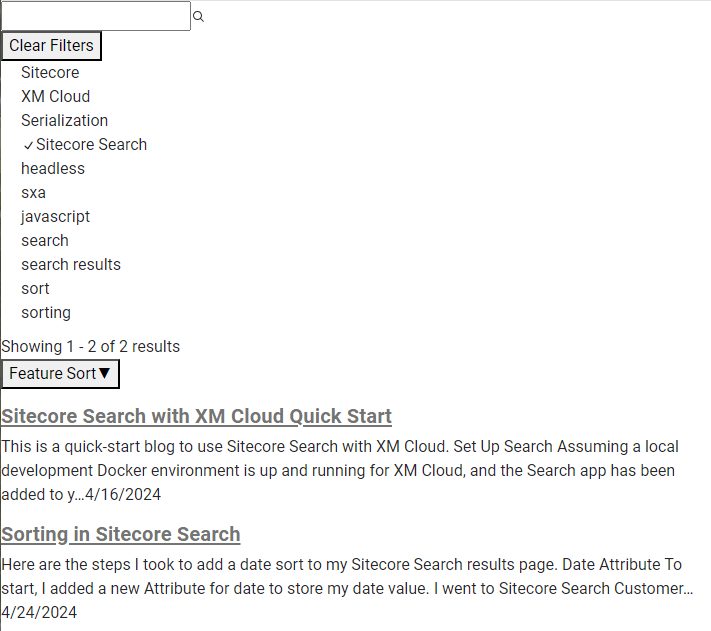
So this code is a mix of out of the box and custom to get the code for facets to function the way I want it to. My crud front end shows a list of tags. Clicking on one displays the blogs associated with that tag in the search results. One tag can belong to many blogs and one blog can have many tags.
References
- https://doc.sitecore.com/search/en/developers/search-js-sdk-for-react/development-using-custom-ui-components.html
- https://doc.sitecore.com/search/en/developers/search-js-sdk-for-react/introduction-to-sitecore-search-js-sdk-for-react.html
- https://github.com/Sitecore/Sitecore-Search-JS-SDK-Starter-Kit/blob/main/src/widgets/PreviewSearch/index.jsx
- https://doc.sitecore.com/search/en/users/search-user-guide/working-with-attributes.html
 Sitecore XM Cloud