
If you want to use Sitecore Search functions, like facets, on items smaller than pages, like products, services or courses offered, you may want to add a webhook to their creation in XM Cloud. The webhook can push the data from changed items into the Sitecore Search index using an Azure Function App. This blog discuss the process of creating an API Push source in Sitecore Search, a Function App in Azure and a webhook in Sitecore XM Cloud.
Sitecore Search
In Sitecore Search, I needed new attributes and new facets so I added new attributes to the Attributes page in the Domain Settings section.
Attributes
For new attributes, I made sure they were all strings and they had these settings as well: Return In Api Response; Available For Quick Look; Available For Ranking Recipes. On the Use For Features tab, I made sure the Facets and Sorting Options were checked.
API Push Source
I created a new source in Sitecore Search, and chose the type of “API Push”. There are not many properties to define in the source, besides locales, because the data structure is defined by the JSON data that is pushed into this source.
API Key
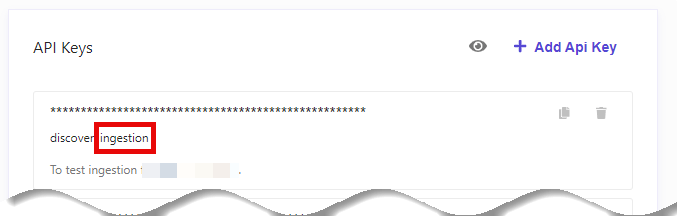
I created a new API Key for the source and made sure to give it the “ingestion” scope.
Facets
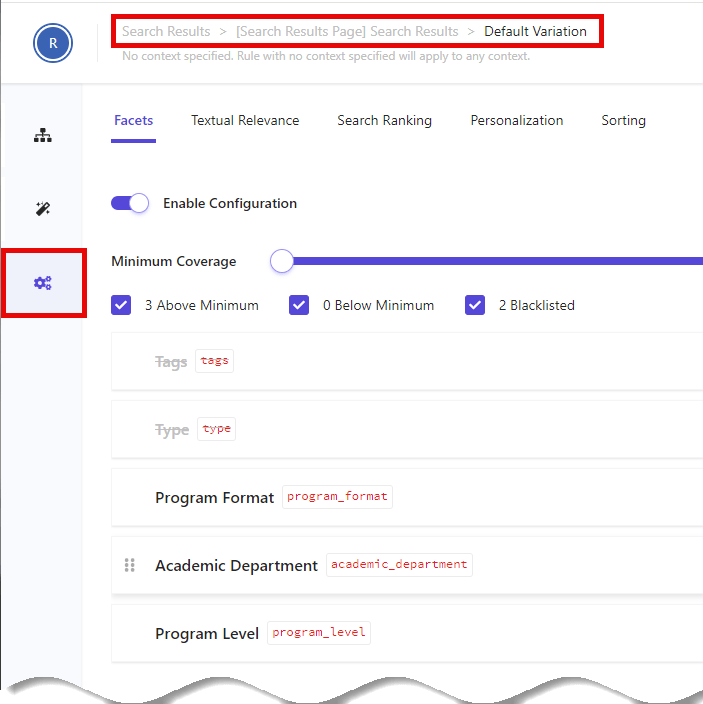
I made the new facets available to my widget by, first, making them available from the Facets card on the Global Widget Settings screen in the Global Resources tab. Then I choose the facets I wanted for the widget by editing the widget from the Widgets tab. I edited the Default Variation for my widget. I clicked on Edit for the Rules for the Default Variation and then I clicked on the Settings card. Here, I chose the facets I want available to my widget.
Azure Function App
Sitecore’s Webhook function posts JSON about the current item to a location of your choosing, during an event of your choosing. Unfortunately, the JSON from Sitecore does not match the JSON required for the Push API source in Sitecore Search. To rectify this discrepancy, I created a Function App in Azure to receive the JSON POST from Sitecore and create and POST or PATCH a new JSON data object to Sitecore Search.
Sitecore Webhook JSON Example
Here is an example of the JSON posted from a Sitecore Webhook. Note that changes to the item are at the bottom and field IDs are sent, not names.
{
  "EventName": "item:saved",
  "Item": {
    "Language": "en",
    "Version": 1,
    "Id": "67357055-b264-4517-9fae-8ffcffe7b852",
    "Name": "Science",
    "ParentId": "12baa678-7ff2-4373-9091-bfb620290322",
    "TemplateId": "025a07b5-3f5f-40a4-8a4f-0abeb3a99f8c",
    "TemplateName": "Program",
    "MasterId": "00000000-0000-0000-0000-000000000000",
    "SharedFields": [],
    "UnversionedFields": [],
    "VersionedFields": [
      {
        "Id": "9092a63a-b44f-48a0-88ab-cc0c40c5ee7b",
        "Value": "Data Science Program",
        "Version": 1,
        "Language": "en"
      },
      {
        "Id": "47ce4618-634a-4ef2-92d0-6d0d1b944b26",
        "Value": "Bachelor of Science",
        "Version": 1,
        "Language": "en"
      },
      {
        "Id": "0eba3f8d-dba1-4903-9553-42460ca5f52e",
        "Value": "Mathematics",
        "Version": 1,
        "Language": "en"
      },
      {
        "Id": "94a4cd1a-4432-4c6f-ad7a-265b771dd154",
        "Value": "In Person",
        "Version": 1,
        "Language": "en"
      },
      {
        "Id": "86f6ccc4-5724-4a87-b6f1-1d9d34e06941",
        "Value": "https://myurl.edu/math/science",
        "Version": 1,
        "Language": "en"
      },
      {
        "Id": "6b182d3c-4131-4ff6-81f5-796ec9e9388e",
        "Value": "2",
        "Version": 1,
        "Language": "en"
      },
      {
        "Id": "52807595-0f8f-4b20-8d2a-cb71d28c6103",
        "Value": "sitecore\\dgregory",
        "Version": 1,
        "Language": "en"
      },
      {
        "Id": "25bed78c-4957-4165-998a-ca1b52f67497",
        "Value": "20240508T184447Z",
        "Version": 1,
        "Language": "en"
      },
      {
        "Id": "5dd74568-4d4b-44c1-b513-0af5f4cda34f",
        "Value": "sitecore\\dgregory",
        "Version": 1,
        "Language": "en"
      },
      {
        "Id": "8cdc337e-a112-42fb-bbb4-4143751e123f",
        "Value": "928e3059-f380-4a8a-9a35-06ba06649d10",
        "Version": 1,
        "Language": "en"
      },
      {
        "Id": "d9cf14b1-fa16-4ba6-9288-e8a174d4d522",
        "Value": "20240508T184925Z",
        "Version": 1,
        "Language": "en"
      },
      {
        "Id": "badd9cf9-53e0-4d0c-bcc0-2d784c282f6a",
        "Value": "sitecore\\dgregory",
        "Version": 1,
        "Language": "en"
      }
    ]
  },
  "Changes": {
    "FieldChanges": [
      {
        "FieldId": "d9cf14b1-fa16-4ba6-9288-e8a174d4d522",
        "Value": "20240508T184925Z",
        "OriginalValue": "20240508T184518Z"
      },
      {
        "FieldId": "8cdc337e-a112-42fb-bbb4-4143751e123f",
        "Value": "928e3059-f380-4a8a-9a35-06ba06649d10",
        "OriginalValue": "d5526a3e-bc6e-4d86-86c6-c40b2d8f1085"
      },
      {
        "FieldId": "badd9cf9-53e0-4d0c-bcc0-2d784c282f6a",
        "Value": "sitecore\\dgregory",
        "OriginalValue": "sitecore\\gregory@rdacorp.com"
      },
      {
        "FieldId": "9092a63a-b44f-48a0-88ab-cc0c40c5ee7b",
        "Value": "Data Science Progrm",
        "OriginalValue": "Science"
      }
    ],
    "PropertyChanges": [],
    "IsUnversionedFieldChanged": false,
    "IsSharedFieldChanged": false
  },
  "WebhookItemId": "07087b95-61d9-457a-8b43-e4f5f005a0d1",
  "WebhookItemName": "Test Programs"
}
Sitecore Search Push API JSON Example
Here is an example of the JSON that the Sitecore Search Push API wants to ingest.
{
  "id": "67357055-b264-4517-9fae-8ffcffe7b852",
  "fields": {
    "name": "Data Science Program",
    "program_level": "Bachelor of Science",
    "academic_department": "Mathematics",
    "program_format": "In Person",
    "url": "https://myurl.edu/math/science",
    "type": "Program"
  }
}
Function App in Azure
In Azure, I created a new Function App with a Linux operating system and based on .NET 6. I deployed the code using Publish in Visual Studio.
Function App Code
I created a Visual Studio solution with an Azure Functions project. I made sure the .NET version was the same as my Azure Function App. I created a function named “ItemSaved” with the following code:
using System.IO;
using System.Threading.Tasks;
using Microsoft.AspNetCore.Mvc;
using Microsoft.Azure.WebJobs;
using Microsoft.Azure.WebJobs.Extensions.Http;
using Microsoft.AspNetCore.Http;
using Microsoft.Extensions.Logging;
using Newtonsoft.Json;
using System.Net.Http;

namespace FunctionProgramsToSearch
{
    public static class ItemSaved
    {
        [FunctionName("ItemSaved")]
        public static async Task<IActionResult> Run(
            [HttpTrigger(AuthorizationLevel.Function, "post", Route = null)] HttpRequest req,
            ILogger log)
        {
            log.LogInformation("C# HTTP trigger function processed a request.");

            string itemName = req.Query["name"];

            string requestBody = await new StreamReader(req.Body).ReadToEndAsync();
            dynamic data = JsonConvert.DeserializeObject(requestBody);
            itemName = itemName ?? data?.Item?.Name;

            string id = data?.Item?.Id;
            string name = "";
            string program_level = "";
            string academic_department = "";
            string program_format = "";
            string url = "";
            string type = "Program";

            dynamic versionedFields = data?.Item?.VersionedFields;
            foreach (dynamic field in versionedFields)
            {
                if (field.Id.ToString().Equals("9092a63a-b44f-48a0-88ab-cc0c40c5ee7b")) // Name/Title
                {
                    name = field.Value;
                }
                else if (field.Id.ToString().Equals("47ce4618-634a-4ef2-92d0-6d0d1b944b26")) // Program Level
                {
                    program_level = field.Value;
                }
                else if (field.Id.ToString().Equals("0eba3f8d-dba1-4903-9553-42460ca5f52e")) // Academic Department
                {
                    academic_department = field.Value;
                }
                else if (field.Id.ToString().Equals("94a4cd1a-4432-4c6f-ad7a-265b771dd154")) // Program Format
                {
                    program_format = field.Value;
                }
                else if (field.Id.ToString().Equals("86f6ccc4-5724-4a87-b6f1-1d9d34e06941")) // URL
                {
                    url = field.Value;
                }
                else if (field.Id.ToString().Equals("bd955a43-6ba4-4495-ba26-16e170c9629c")) // Content Type
                {
                    type = field.Value;
                }
            }
            log.LogInformation("Fields retrieved");
            var document = new document
            {
                id = id,
                fields = new fields
                {
                    name = name,
                    program_level = program_level,
                    academic_department = academic_department,
                    program_format = program_format,
                    url = url,
                    type = type
                }
            };

            var jsonDocument = JsonConvert.SerializeObject(document);

            jsonDocument = "{ \"document\" : " + jsonDocument + " }";

            // If this is a change, do a patch
            bool isChanged = false;
            dynamic changedFields = data?.Changes;
            if (changedFields != null)
            {
                // Check to see if this ID is already in the index
                Widget Widget = new Widget();
                Widget.widget = new widget();
                Widget.widget.items = new items[1];
                Widget.widget.items[0] = new items();
                Widget.widget.items[0].entity = "content";
                Widget.widget.items[0].rfk_id = "rfkid_7";
                Widget.widget.items[0].search = new search();
                Widget.widget.items[0].search.content = new content();
                Widget.widget.items[0].search.content.fields = new string[] { "id" };
                Widget.widget.items[0].search.filter = new filter();
                Widget.widget.items[0].search.filter.name = "id";
                Widget.widget.items[0].search.filter.type = "eq";
                Widget.widget.items[0].search.filter.value = id.ToLower();
                Widget.widget.items[0].sources = new string[] { "{YOUR_SOURCE_ID}" };

                var jsonCheckDocument = JsonConvert.SerializeObject(Widget);

                log.LogInformation("Changes detected, so update the item in the index if found");

                // Post to find existing item
                var clientPost = new HttpClient();
                var requestPost = new HttpRequestMessage(HttpMethod.Post, "https://discover.sitecorecloud.io/discover/v2/{YOUR_DOMAIN_ID}");
                requestPost.Headers.Add("Authorization", "{YOUR_API_KEY");
                requestPost.Content = new StringContent(jsonCheckDocument);
                var responsePost = await clientPost.SendAsync(requestPost);

                if (responsePost.IsSuccessStatusCode)
                {
                    log.LogInformation($"Document {id} post looking for indexed item successfully");

                    var responseBody = responsePost.Content.ReadAsStringAsync();
                    dynamic response = JsonConvert.DeserializeObject(responseBody.Result);

                    // log.LogInformation($"documentCResponse: {response}");

                    if (response != null && response.widgets != null && response.widgets[0].total_item > 0)
                    {
                        log.LogInformation("Document post looking for indexed item found.");

                        var clientPatch = new HttpClient();
                        var requestPatch = new HttpRequestMessage(HttpMethod.Patch, "https://discover.sitecorecloud.io/ingestion/v1/domains/{YOUR_DOMAIN_ID}/sources/{YOUR_SOURCE_ID}/entities/content/documents/" + id + "?locale=en_us");
                        requestPatch.Headers.Add("Authorization", "{YOUR_API_KEY}");
                        requestPatch.Content = new StringContent(jsonDocument);
                        var responsePatch = await clientPatch.SendAsync(requestPatch);
                        if (responsePatch.IsSuccessStatusCode)
                        {
                            isChanged = true;
                            log.LogInformation($"Document {id} updated successfully");
                        }
                        else
                        {
                            log.LogInformation("Document update failed. " + responsePatch.Content.ToString() + "|" + responsePatch.StatusCode.ToString());
                        }

                    }
                    else
                    {
                        log.LogInformation("Document post looking for indexed item not found.");
                    }
                }
                else
                {
                    log.LogInformation("Document post looking for indexed item failed. " + responsePost.Content.ToString() + "|" + responsePost.StatusCode.ToString());
                }

            }

            if (!isChanged)
            {
                log.LogInformation("No changes detected. New item.");

                // Post to Sitecore Search API
                var clientPost = new HttpClient();
                var requestPost = new HttpRequestMessage(HttpMethod.Post, "https://discover.sitecorecloud.io/ingestion/v1/domains/{YOUR_DOMAIN_ID}/sources/{YOUR_SOURCE_ID}/entities/content/documents?locale=en_us");
                requestPost.Headers.Add("Authorization", "{YOUR_API_KEY}");
                requestPost.Content = new StringContent(jsonDocument);
                var responsePost = await clientPost.SendAsync(requestPost);
                // response.EnsureSuccessStatusCode(); // Ensure does NOT work in Azure Function App

                if (responsePost.IsSuccessStatusCode)
                {
                    log.LogInformation($"Document {id} posted to search successfully");
                }
                else
                {
                    log.LogInformation("Document post to search failed. " + responsePost.Content.ToString() + "|" + responsePost.StatusCode.ToString());
                }
            }
            string responseMessage = string.IsNullOrEmpty(itemName)
                ? "This HTTP triggered function executed successfully."
                : $"This HTTP triggered function executed successfully for item {itemName}.";

            return new OkObjectResult(responseMessage);
        }
    }
}
To support the code I created two class files with objects for serialization.
namespace FunctionProgramsToSearch
{
    class document
    {
        public string id;
        public fields fields;
    }

    class fields
    {
        public string name;
        public string program_level;
        public string academic_department;
        public string program_format;
        public string url;
        public string type;
    }
}
namespace FunctionProgramsToSearch
{
    class  Widget
    {
        public widget widget;
    }
    class widget
    {
        public items[] items;
    }

    class items
    {
        public string entity;
        public string rfk_id;
        public search search;
        public string[] sources;
    }

    class  search
    {
        public content content;
        public filter filter;
    }

    class content
    {
        public string[] fields;
    }

    class filter
    {
        public string name;
        public string type;
        public string value;
    }
}
XM Cloud
The next step for me was to add the data template and webhook in Sitecore XM Cloud.
Data Template
I created a data template and made the fields, all strings, match the names of the attributes I had created in Sitecore Search. I made the Display Names human readable by changing each field’s title.
Webhook
Under the System folder I created a new Webhook. I assigned it the “item_saved” event and made the rule for this Webhook “where the item is the {CHOSEN_FOLDER) item or one of its descendants”. Since the key for the Function App is in the URL, I didn’t need to set the Authorization. I pulled the URL for this Webhook from the “Get Function Url” button on the Function App after I published it to the Azure Function App resource.
Testing
I tested the Sitecore Webhook by utilizing the application at https://webhook.site. Here I could see what data is posted from Sitecore.
I tested the Function App locally by running it locally and POSTing the JSON it required (retrieved from https://webhook.site) to it using Postman. I was unable to test the Webhook locally because I couldn’t use the Function App locally and Docker at the same time.
When everything looked good, I tested the Azure Function App from Sitecore XM Cloud running locally.
Facets in React Code
After my testing went well, I tested the new facets in my code, locally with Docker. I changed the out of the box code by making each search result act more like a card using Bootstrap. I also added my fields to the search results. The small code changes gave the affect I was looking for: the facets worked, manipulating the “cards” on the page.
 Sitecore XM Cloud