
If you have attributes with dates as Timestamps in your Sitecore Search you may notice that it is difficult to filter by dates as Timestamp with custom controls. With some help from the Sitecore Slack Channel, I was able to use dates as Integers in Sitecore Search and make them facets to use with the onFacetClick event. Note for this solution, I am using a webhook to send data to Service Bus before writing it using the Push API to Sitecore Search.
Push API for Sitecore Search
I add the attributes I want to Sitecore Search and add attributes for Start Date and End Date as Integers:

Make sure the date attributes are available for Facets. Next, make the new attributes are set up as facets on the Facets screen:

When you push the data into Sitecore Search, make sure it goes in as a naturally searchable value, like (YYYMMDD):
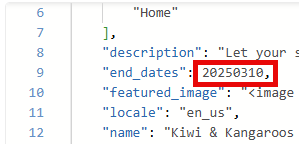
My code looks like this:
 if (field.Id == TourListSitecoreFields.EndDate)
 {
     if ((!string.IsNullOrEmpty(field.Value)) && (field.JsonValue != null))
     {
         int date = int.Parse(field.Value.Split('T')[0]);
         document.Document.Fields.EndDates = date;
     }

     continue;
 }
MUI
I chose to use MUI’s date picker so I installed the components in my XM Cloud code.
npm install @mui/material @emotion/react @emotion/styled
npm install @mui/x-date-pickers
npm install dayjs
I added the import statements to my code with search results and facets already:
import { Dayjs } from 'dayjs';
import { AdapterDayjs } from '@mui/x-date-pickers/AdapterDayjs';
import { LocalizationProvider } from '@mui/x-date-pickers/LocalizationProvider';
import { DatePicker } from '@mui/x-date-pickers/DatePicker';
I use state to keep track of the two sets of values, one I send to Sitecore Search and the other to manage the MUI controller with DayJS typed dates:
  // Values for Sitecore Search YYYYMMDD
  const [startDate, setStartDate] = useState<number | undefined>();
  const [endDate, setEndDate] = useState<number | undefined>();

  // Values for Material UI DatePicker, so I can clear it with the ootb Clear button
  const [startDayjs, setStartDayjs] = useState<Dayjs | null | undefined>();
  const [endDayjs, setEndDayjs] = useState<Dayjs | null | undefined>();
I added a new section to my code above the Search Results and below the OOTB facets:
<section>
              <div className={`row controls`} style={{ marginTop: -50, display: 'flex' }}>
                {facetFilters.includes('start_date') && (
                  <div
                    className={`col-12 col-lg-3 col-sm-6`}
                    key="1"
                    style={{ marginBottom: 12 }}
                  >
                    <LocalizationProvider dateAdapter={AdapterDayjs}>
                      <DatePicker
                        key="1"
                        label="Choose Start Date"
                        onChange={(newValue) => FilterClick('start', newValue)}
                        value={startDayjs}
                        slotProps={{
                          // Can control inherited text field with slot props
                          textField: {
                            InputProps: {
                              disableUnderline: true,
                              style: {
                                backgroundColor: 'white',
                                fontFamily: '"Metropolis", sans-serif',
                              },
                            },
                          },
                        }}
                        sx={{
                          fontFamily: '"Metropolis", sans-serif',
                          '& .MuiIconButton-root': {
                            // Target the icon button inside the DateRangePicker
                            fontFamily: '"Metropolis", sans-serif', // Set background color to white
                          },
                          '& .MuiInputLabel-root': {
                            fontFamily: '"Metropolis", sans-serif', //Change the label font
                          },
                          input: { fontFamily: '"Metropolis", sans-serif' },
                        }}
                      />
                    </LocalizationProvider>
                  </div>
                )}
                {facetFilters.includes('end_date') && (
                  <div
                    className={`col-12 col-lg-3 col-sm-6`}
                    key="2"
                    style={{ marginBottom: 12 }}
                  >
                    <LocalizationProvider dateAdapter={AdapterDayjs}>
                      <DatePicker
                        key="2"
                        label="Choose End Date"
                        onChange={(newValue) => FilterClick('end', newValue)}
                        value={endDayjs}
                        slotProps={{
                          // Can control inherited text field with slot props
                          textField: {
                            InputProps: {
                              disableUnderline: true,
                              style: {
                                backgroundColor: 'white',
                                fontFamily: '"Metropolis", sans-serif',
                              },
                            },
                          },
                        }}
                        sx={{
                          fontFamily: '"Metropolis", sans-serif',
                          '& .MuiIconButton-root': {
                            // Target the icon button inside the DateRangePicker
                            fontFamily: '"Metropolis", sans-serif', // Set background color to white
                          },
                          '& .MuiInputLabel-root': {
                            fontFamily: '"Metropolis", sans-serif', //Change the label font
                          },
                          input: { fontFamily: '"Metropolis", sans-serif' },
                        }}
                      />
                    </LocalizationProvider>
                  </div>
                )}
              </div>
            </section>
Front End
This gives a good-looking date picker right below the ooth facets:
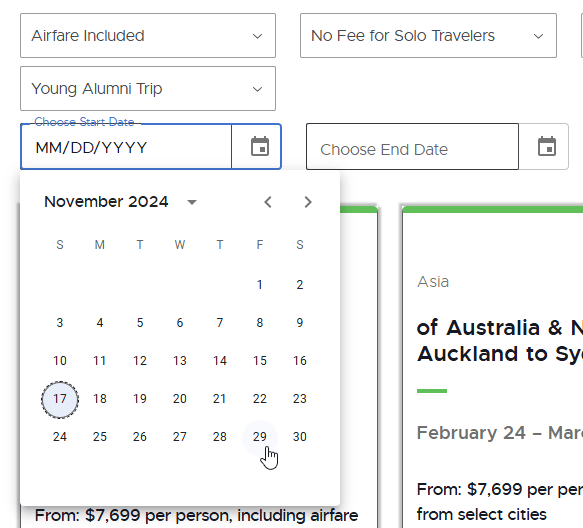
Notice I use the date kept in state to set the MUI Date Picker. Otherwise we couldn’t control the date that shows when a user clears all the filters. On date change the code calls a function called FilterClick:
function FilterClick(dateType: string, newValue: Dayjs | null) {
    const date = newValue ? parseInt(newValue?.format('YYYYMMDD')) : 0;
    // onClearFilters();
    if (dateType === 'start') {
      setStartDate(date);
      setStartDayjs(newValue);
      const maxDate = endDate ? endDate : 20300101;
      onFacetClick({
        type: 'range',
        facetId: 'start_date',
        facetIndex: 0, // Does nothing, all values are needed though
        checked: true,
        min: date,
        max: maxDate,
      });
    }
    if (dateType === 'end') {
      setEndDate(date);
      setEndDayjs(newValue);
      const minDate = startDate ? startDate : 20200101;
      onFacetClick({
        type: 'range',
        facetId: 'end_date',
        facetIndex: 0, // Does nothing, all values are needed though
        checked: true,
        min: minDate,
        max: date,
      });
    }
  }
The key is to set the type to ‘range’. I also added a new function below the onClearFilters() function:
  {selectedFacetsFromApi.length > 0 && (
                <div className={`row controls`}>
                  <div className={`col-6`}>
                    <div
                      className="clear-button"
                      role="button"
                      aria-label="clear filters"
                      tabIndex={0}
                      style={{ display: 'block' }}
                      onClick={() => {
                        onClearFilters();
                        onClearCustomFilters();
                      }}
                    >
                      <span>CLEAR</span>
                      <div className="close-icon"></div>
                    </div>
                  </div>
                </div>
              )}
The onClearCustomFunction sets all the dates back to undefined:
  function onClearCustomFilters() {
    setStartDate(undefined);
    setEndDate(undefined);
    setStartDayjs(undefined);
    setEndDayjs(undefined);
  }
So you can’t use filter functions to change the dates consistently, but you can add them as facets and set the type to range on the onFacetClick event.
References
- https://sitecorechat.slack.com/archives/C0ET2PG8N/p1728651678329139
- https://doc.sitecore.com/search/en/users/search-user-guide/filters-and-facets.html#filter-options
- https://doc.sitecore.com/search/en/developers/search-js-sdk-for-react/customize-facets-in-a-search-results-widget.html#add-initial-values-for-facets
- https://mui.com/x/react-date-pickers/date-picker/
 Sitecore XM Cloud